


Wind Compass
4.4533.00 Reviews
App Specs
- Version
- 1.11.0(97)
- Updated On
- License
- Free
- Downloads
- 100,000+
- Developer
- Maple Media
- Categories
- Weather
- Platform
- Android
Screenshots
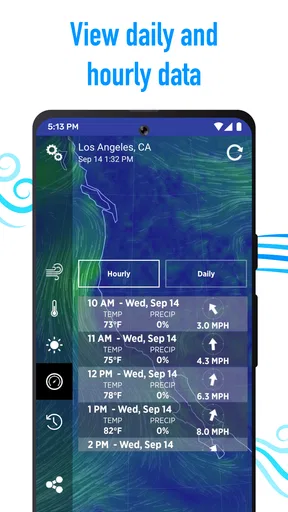
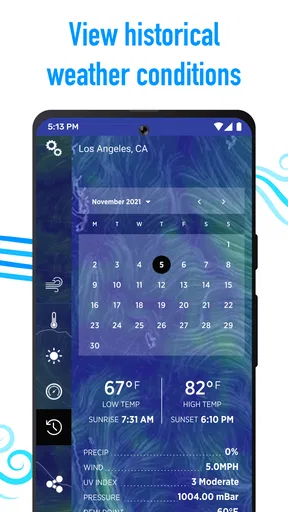
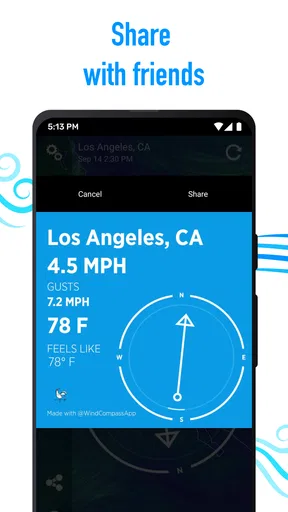
 Analysis by AppCompare
I judge a weather app by whether it helps me make a better decision before the weather becomes a problem. Wind Compass has a clear focus: it puts wind direction and speed at the center, with daily weather forecasts alongside them. That makes it more useful for planning a specific outdoor activity than for replacing a full-featured weather service. I like that distinction, though I would treat any wind reading as one part of a plan, not a guarantee of conditions at every point along a route.
It is a free weather app from Maple Media, and its straightforward premise is easy to understand: check the wind, consider the forecast, then decide whether to head out or adjust plans. The app has an average rating of 4.3 from around 2.3 thousand ratings, with over 100 thousand installs. Those figures suggest it has found an audience, but what matters more to me is whether its wind-first approach suits the way you spend time outside.
Where a wind-focused view earns its place
Wind is easy to overlook when checking a standard forecast, especially if the main screen emphasizes temperature and rain. Yet it can decide whether a lakeside picnic feels pleasant, whether a run into a headwind is worth doing, or whether a day with a kite will be frustrating. Keeping direction and speed prominent gives me a quick prompt to think beyond “Is it sunny?” and ask how the weather will actually feel.
The most helpful way to use a compass-style display is to read it in context. Direction tells me where the wind is coming from, while speed gives an idea of how forcefully it may affect an activity. Neither should be treated as a complete safety assessment. Local terrain, buildings, trees, and sudden changes can make conditions feel different from a general reading, so I would check again at the location and stay ready to change plans.
How I would fit it into a real day
For a practical example, imagine I have a free afternoon and need to choose between a walk along an exposed waterfront and a sheltered path through a park. I would check the wind before leaving, use its direction to think about which route might feel more comfortable, then compare that with the day’s forecast. If the waterfront looks unpleasant, the app has helped me make a useful choice even if I never use it for a technical sport.
That same habit can help with small decisions: which side of a picnic area to choose, whether to bring a light outer layer, or whether a breezy route is a bad match for a casual bike ride. I would not rely on a single check made hours earlier. A forecast helps with planning, while a fresh reading near the time and place of an activity is more relevant to the decision in front of me.
What to expect from the app
Wind Compass is rated for Everyone, and it is free to download, although it offers in-app purchases ranging from around $0.99 to $99.99 per item. That makes it easy to try the basic idea before deciding whether anything beyond it is worth paying for. I would look at the purchase details in the app before committing, rather than assuming every feature or display is included at no cost.
Worth Reading Before You Choose

EA SPORTS FC Mobile 26 Is a Bigger Football Game, but It Takes Time

Flipboard Shows What News Apps Must Do Beyond the Feed

Switching to Android Auto Means Rethinking Your Driving Routine

Google Calendar Makes a Crowded Week Easier to Manage

Ludo King Makes the Most of the Minutes Between Plans

Baby Panda World Brings Quick Play to Modern Phones, but Its Game Library Feels Busy
The listed release date is February 14, 2018, and the current version is 1.11.0(97), with Android 8.0 as the minimum operating system requirement. If you are deciding whether an older device can run it, that operating-system requirement is the practical detail to check first. The app’s focused purpose also sets expectations: I would open it for wind-aware planning, while turning to a broader weather app when I want a general daily overview or other tools all in one place.
Getting Started with Wind Compass
First things first, downloading Wind Compass was a breeze (pun intended). It's available on both Android and iOS, making it super accessible no matter what device you're on. The installation was quick, and I was up and running in no time.
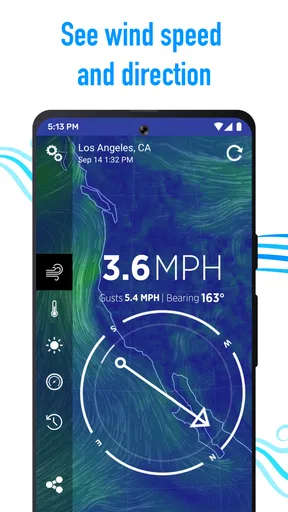
Once you open the app, you’re greeted with a sleek interface that's both intuitive and visually appealing. The home screen provides you with a compass, which is the central feature of the app. This isn't just any ordinary compass; it shows you the wind direction and speed right on your screen. How cool is that?
Features That Stand Out
Now, let's dive into the features because this app is packed with them. Here are a few that caught my attention:
- Real-Time Wind Data: The app provides real-time updates on wind speed and direction. Whether you're at the beach or on a mountaintop, you'll get accurate information on the spot.
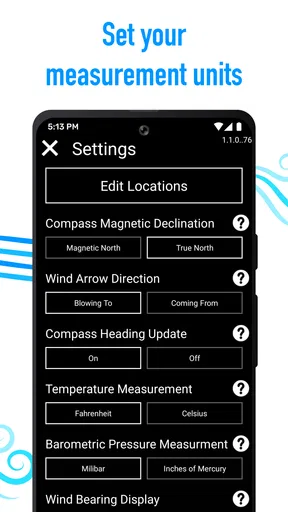
- Customizable Units: You can easily switch between units, choosing between miles per hour, kilometers per hour, or knots. It's perfect for those who like their data in a specific format.
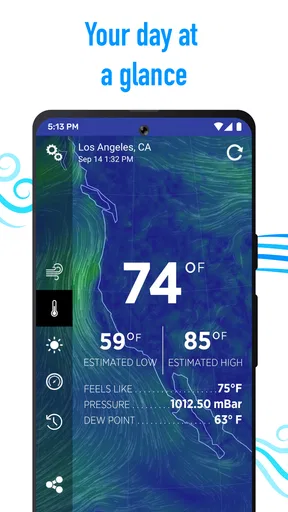
- Weather Forecast: Apart from wind data, the app also offers a detailed weather forecast. It gives you a heads-up on temperature, precipitation, and more, all laid out in a user-friendly manner.
- Map View: This feature allows you to see wind patterns on a map. You can zoom in and out to get a broader view of the area, which is incredibly helpful for planning outdoor activities.
User Experience and Interface
In terms of user experience, Wind Compass is a winner. The interface is clean and straightforward, ensuring that even those who aren't tech-savvy can navigate it with ease. I appreciated how the app didn't overwhelm me with too much information at once. Everything was neatly organized, making it easy to find what I needed.
One thing that really impressed me was the app's responsiveness. The data updates quickly, and I didn't experience any lag, which is crucial when you're relying on real-time information.
Practical Applications
You might be wondering, "When would I actually use this app?" Trust me, there are plenty of scenarios where it comes in handy. If you're a sailor, knowing the wind conditions is essential for navigation. For those into kite surfing or paragliding, accurate wind data can make or break your experience.
Even if you're just planning a casual picnic, it's nice to know if you're going to be dealing with a gusty afternoon. Personally, I found it useful when planning my morning runs. It helped me decide on the best route based on wind direction, which is something I never considered before.
Choosing the right level of reliance
There is an important distinction between useful planning information and a substitute for on-site judgment. For a walk, run, or picnic, a quick glance can be enough to compare options. For sailing, kite surfing, or paragliding, I would use the app as a preliminary check and consult the guidance and equipment I normally rely on for that activity. A general-purpose phone app cannot make a risky decision safe simply by showing wind figures.
One non-obvious habit that makes the compass more useful is to check your intended direction of travel, not just the number on the screen. A headwind can make an outward leg feel demanding, while the return may be easier; a crosswind can matter more on an exposed path or ride than it does among buildings. Thinking about the route this way turns a reading into a practical choice rather than another piece of weather information to glance at and forget.
I would also avoid comparing readings from different days without considering where and when they were taken. A sheltered street and an open shore can behave very differently, even when they are close together. If conditions matter to the plan, check near the place you intend to go, then reassess when you arrive. That is a more sensible workflow than treating a single early check as a promise about the whole afternoon.
Who will appreciate the wind-first approach
I think the app makes the most sense for people who regularly make outdoor plans affected by wind but do not want to start with a complicated specialist tool. Runners can use direction to choose a more comfortable loop; beachgoers can decide whether an exposed spot is appealing; and anyone arranging a picnic can weigh breeze against the rest of the forecast. The value is not that it decides for you, but that it makes wind harder to overlook.
It is less suitable if you mainly want a broad weather dashboard with a large range of general-purpose tools, or if you expect a compass reading to provide detailed local conditions for every point on a long route. In those cases, a conventional weather app may be the better everyday home screen, and a dedicated activity or navigation resource may be more appropriate for specialist decisions. I would use Wind Compass alongside those options when wind is the detail I specifically want to think through.
Another useful trade-off is simplicity versus depth. A focused display can make a quick check less distracting, but experienced users may want more context before committing to a plan. I would start with the wind reading and forecast, then decide whether the information is enough for the stakes involved. For a morning jog, that may be all I need; for a consequential water or air activity, it is only a starting point.
Small habits that make checks more useful
When I am deciding what to wear, I would combine the wind information with the forecast rather than reading speed alone. A mild day can feel less comfortable on an exposed route, while a sheltered destination may make the same conditions easier to handle. The app is most helpful when it changes a concrete choice—route, timing, or whether to bring an extra layer—instead of becoming a number I check out of habit.
For outings with another person, I would use the reading to explain the plan in plain terms: for example, choosing the sheltered path because the open one may be unpleasant. That is a small but practical benefit of a visual wind display; it can make the reason for changing plans easier to discuss. If the forecast and what I feel outside disagree, though, I would trust the conditions around me and adjust rather than insisting that the screen must be right.
Some readers will also wonder whether they need to learn compass terminology before opening the app. I would not make that a barrier. The useful first step is simply to notice the indicated direction and speed, then relate them to the way you plan to travel or the place where you will sit. With repeated checks, the display becomes easier to interpret without turning a casual weather check into a technical exercise.
For a first try, I would keep the workflow simple: open it before choosing an outdoor plan, compare the wind with the day’s forecast, and check again when the decision is time-sensitive. If the units are not familiar, use the format that makes sense to you rather than trying to convert figures in your head. That reduces friction and helps keep attention on the practical question—whether the conditions suit the activity.
Final Thoughts
All in all, Wind Compass is a fantastic tool for anyone who spends time outdoors and needs reliable wind data. It's simple enough for casual users but also packed with features that more experienced users will appreciate. The combination of a user-friendly interface and real-time data makes it a must-have app for outdoor enthusiasts.
If you've ever found yourself at the mercy of unpredictable winds, give this app a try. You might just find it becomes one of your go-to tools for planning outdoor adventures. And hey, it's free to download, so what have you got to lose?
My recommendation
My verdict is positive, with a clear boundary: this is a useful companion when wind is central to a decision, not a reason to abandon common sense or specialist checks. Its direct presentation makes it approachable for everyday outdoor planning, and its wind-first focus gives it a different role from the general forecast app I might open by default. If that is the gap in your routine, it is worth trying; if you rarely make plans around wind, a broader weather app may serve you better.
Pros
- User-friendly interface for easy navigation.
- Accurate wind speed and direction updates.
- Customizable alerts for weather changes.
- Includes additional weather data like humidity.
- Works offline with cached data capabilities.
Cons
- Limited features in the free version.
- Ads can be intrusive at times.
- Requires GPS for precise data.
- No integration with smart home devices.
- Limited customization in map views.
FAQs for Wind Compass
1. What is Wind Compass and how does it work?
Wind Compass is a mobile application designed to provide real-time wind and weather information for various locations. It uses your device’s GPS to determine your current position and offers data such as wind speed, direction, and temperature. The app is particularly useful for outdoor enthusiasts like sailors, kite surfers, and hikers.
2. Is Wind Compass available for both Android and iOS devices?
Yes, Wind Compass is available for download on both Android and iOS platforms. Users can easily find it on the Google Play Store for Android devices or the Apple App Store for iOS devices. The app is designed to be user-friendly on both operating systems, providing a seamless experience.
3. Does Wind Compass require an internet connection to function?
While Wind Compass primarily relies on an internet connection to provide up-to-date weather data, some features may still work offline. However, for the most accurate and current information, it is recommended to use the app with a stable internet connection. Offline usage may limit access to real-time updates.
4. Are there any additional costs or subscriptions required to use Wind Compass?
Wind Compass offers a free version with basic features. However, there might be in-app purchases or subscription options available for advanced features or to remove ads. Users should review the app’s details on their respective app stores to understand any potential costs associated with enhanced functionalities.
5. How accurate is the wind and weather data provided by Wind Compass?
Wind Compass sources its data from reliable meteorological services, ensuring a high level of accuracy. However, users should note that weather conditions can change rapidly, and no app can guarantee 100% precision. Regular updates and using the app with an active internet connection can help maintain data accuracy.


